
Routines
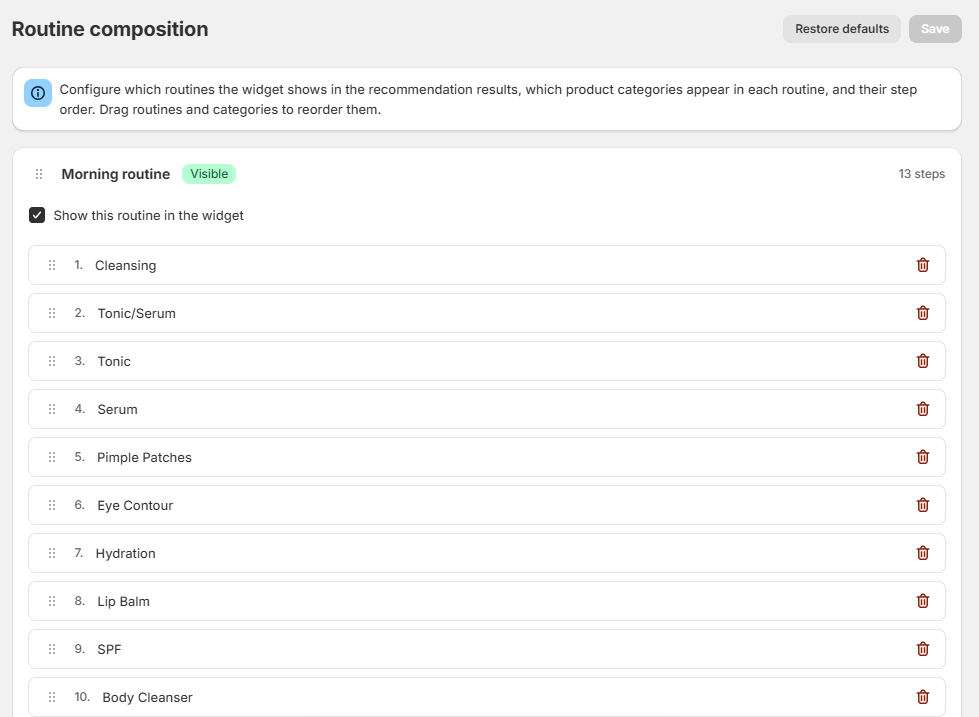
Open Routine Composition. Here you choose which routines appear in the Skin Test results, which modules (product categories) each routine contains, and in which order. The Skin Test fills those steps with your mapped products, based on the analysis and the quiz answers.
Steps
- Open Routine Composition.
- For each routine (Morning routine, Evening routine, Weekly routine, Makeup, Behaviours):
- Turn on Show this routine in the widget if it should appear in the results (badge Visible / Hidden).
- Pick a module in Add a category, then drag to reorder the steps.
- Remove the modules you do not want.
- Click Save. The Unsaved changes badge disappears.
- Restore defaults brings back the original composition.
You can also drag the routines to change their order.
How to think about it
This is not “frequently bought together”. It is a routine built for that skin:
- Morning: cleansing → serum → moisturizer → SPF
- Evening: cleansing → treatment → night cream
- Extras (weekly, makeup, behaviours): only if you want them in the results
A step stays empty if no product is mapped to that module in Product Category Mapping, or if those products are not synced yet (see Field Mapping and sync).