
Plans and usage
Plans are billed by Shopify, in USD, on your Shopify bill. Every shop starts on Free after install: you do not have to pick a plan to publish the Skin Test.
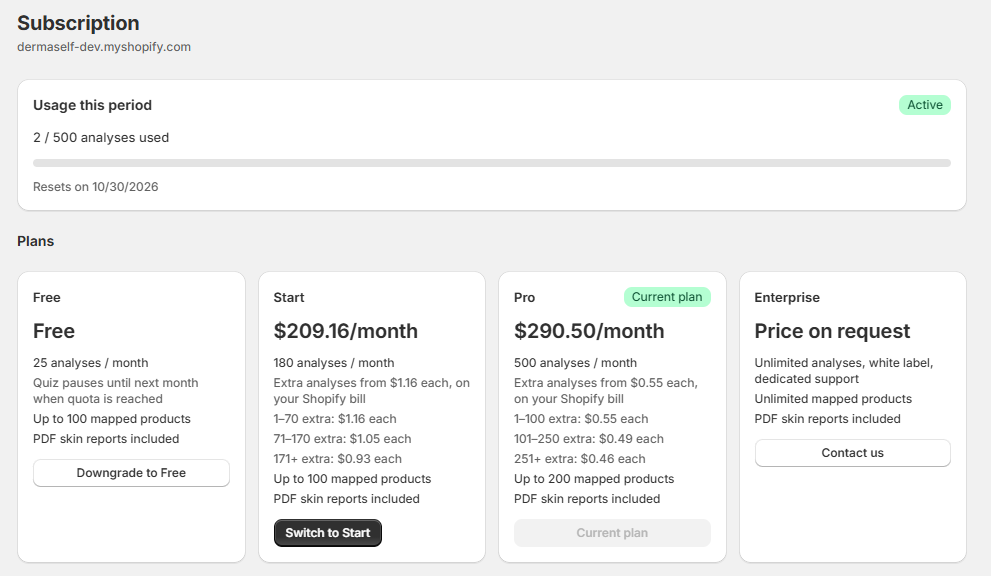
Plans
| Plan | Price | Included analyses | Extra analyses | Mapped products |
|---|---|---|---|---|
| Free | $0 | 25 / month | Not available: the Skin Test pauses until next month | 100 |
| Start | $209.16 / month | 180 | 1–70: $1.16 · 71–170: $1.05 · 171+: $0.93 | 100 |
| Pro | $290.50 / month | 500 | 1–100: $0.55 · 101–250: $0.49 · 251+: $0.46 | 200 |
| Enterprise | On request | Unlimited | — | Unlimited |
What each plan adds:
- Free — the default quiz (you can change its settings and step backgrounds) and Analytics Base (Funnel tab, last 7 or 30 days).
- Start and Pro — the full Quiz Builder and Advanced Analytics (Questions and Revenue tabs, 90-day and custom ranges, device filter).
- Enterprise — white label (no “Powered by Dermaself”) and dedicated support.
Every plan includes PDF reports, product recommendations, and the Klaviyo and Mailchimp integrations. “Powered by Dermaself” shows on every plan except Enterprise.
What counts as an analysis
- Only completed analyses count, once per Skin Test session.
- Failed analyses do not count.
Extra analyses (Start and Pro)
When you use up the included analyses, the Skin Test keeps running: extra analyses are never blocked. They are billed in arrears on your Shopify bill (every 30 days).
Prices are graduated: each tier price applies only to the extra analyses inside that tier.
Example on Start, with 250 extra analyses in one cycle:
| Tier | Analyses | Cost |
|---|---|---|
| 1–70 at $1.16 | 70 | $81.20 |
| 71–170 at $1.05 | 100 | $105.00 |
| 171+ at $0.93 | 80 | $74.40 |
| Extra total | 250 | $260.60 |
That is $260.60 on top of the $209.16 plan price.
If you go well beyond the included analyses in a cycle, the Subscription page suggests Enterprise, which costs less at that volume.
When the counter resets
- Start and Pro: on your Shopify billing date.
- Free: every month. When the 25 analyses are used up, the Skin Test pauses on the storefront (shoppers see it as unavailable) until the counter resets, or until you move to Start or Pro.
The Subscription page
Open Subscription in the app sidebar. You see:
- Usage this period: analyses used out of the included ones, and the reset date.
- An estimate of the extra analyses this cycle and their cost on your next Shopify bill.
- Banners at 80% and 100% of the included analyses.
- The plan grid: Free, Start, Pro, Enterprise.
Change plan
- Open Subscription.
- Click the button on the plan you want (for example Upgrade to Pro). To go back to Free, click Downgrade to Free and confirm.
- Shopify opens its plan page: review the change and confirm it there.
- Back in the app, the new plan shows as Current plan. While Shopify is still confirming, the page shows Pending approval.
Enterprise is not self-serve: click Contact us on the Enterprise card to email the Dermaself team.